Want to impress your manager? Start with this simple habit.
Congratulations on landing your new role! Whether it’s your first job after graduating or the next step in your career, the early days can feel exciting—and a little overwhelming. You’ll be welcomed, onboarded, given tasks to complete… and then suddenly find yourself staring at your screen unsure how to move forward.
Here’s the first rule to remember: don’t run to your boss’s office every time you hit a roadblock.
Put yourself in their shoes
Your manager has just hired someone new. They know you won’t understand everything on day one. You might bring subject‑matter expertise, but you won’t know the systems, processes, or shortcuts yet. They expect to coach you—but they also still have their own workload, meetings, and team to manage.
They’ll check in with you, schedule quick 1:1s, and help you get up to speed. Your job is to make the most of those moments.
Use technology to stay organised
This is where a simple tool can make a huge difference. I recommend using OneNote* because it’s already installed on most work computers and syncs across your laptop, phone, and iPad.
Create a page with your boss’s name.
Every time you have a question, add it to the list.
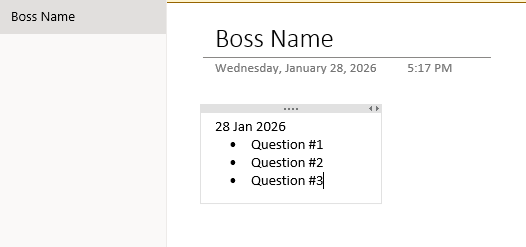
It can be as simple as this…
When your manager swings by or your 1:1 starts, you’re ready with a clear agenda instead of scrambling through notebooks or trying to remember what you meant to ask. The search function makes it even easier to find notes you’ve taken earlier.
This small habit makes you look prepared, thoughtful, and respectful of their time.
Stand out by showing initiative
While you’re waiting for your next check‑in, try answering your own questions or drafting possible solutions. Even if you’re not sure you’re right, the effort shows initiative and critical thinking—two qualities every manager values.
Middle managers in particular are squeezed from all sides. Someone who organises themselves, respects their time, and comes prepared is a breath of fresh air.
And by the way, this isn’t just for new hires. I’ve worked with seasoned professionals who recently adopted OneNote and they can’t believe how much more efficient their days have become.
Next steps
Open OneNote and create a page with your boss’s name.
Add questions or discussion points as they come up.
Watch a quick tutorial on using OneNote across devices.
How to Use OneNote Across All Your Devices (Open OneNote Notebooks on Any Device)
Spend ten minutes learning the basics—you’ll be operating at a higher level than most people around you.
*Other tools like Evernote, Notion, and Google Keep work similarly. I’m not compensated for recommending OneNote; it’s simply accessible, powerful, and ready to go on most office setups.